BlueStacks AI: A Safe Way to Run Your AI Agents Like OpenClaw on Your PC/Mac
AI agents are getting serious.
They aren't just answering questions anymore. They're running code, browsing, and accessing files on your desktop — basically, they have your permissions. That's great, but it's a huge security risk.
The Big Problem (According to NVIDIA)
If an agent runs without protection, it can mess with your files, grab your API keys, and generally compromise your whole machine. NVIDIA's AI Red Team agrees that sandboxing (isolating the agent from the rest of your PC) is mandatory.
BlueStacks AI Solves this Problem
BlueStacks AI is built to run AI agents safely from the start, with security embedded into the architecture itself. That approach is already being applied.
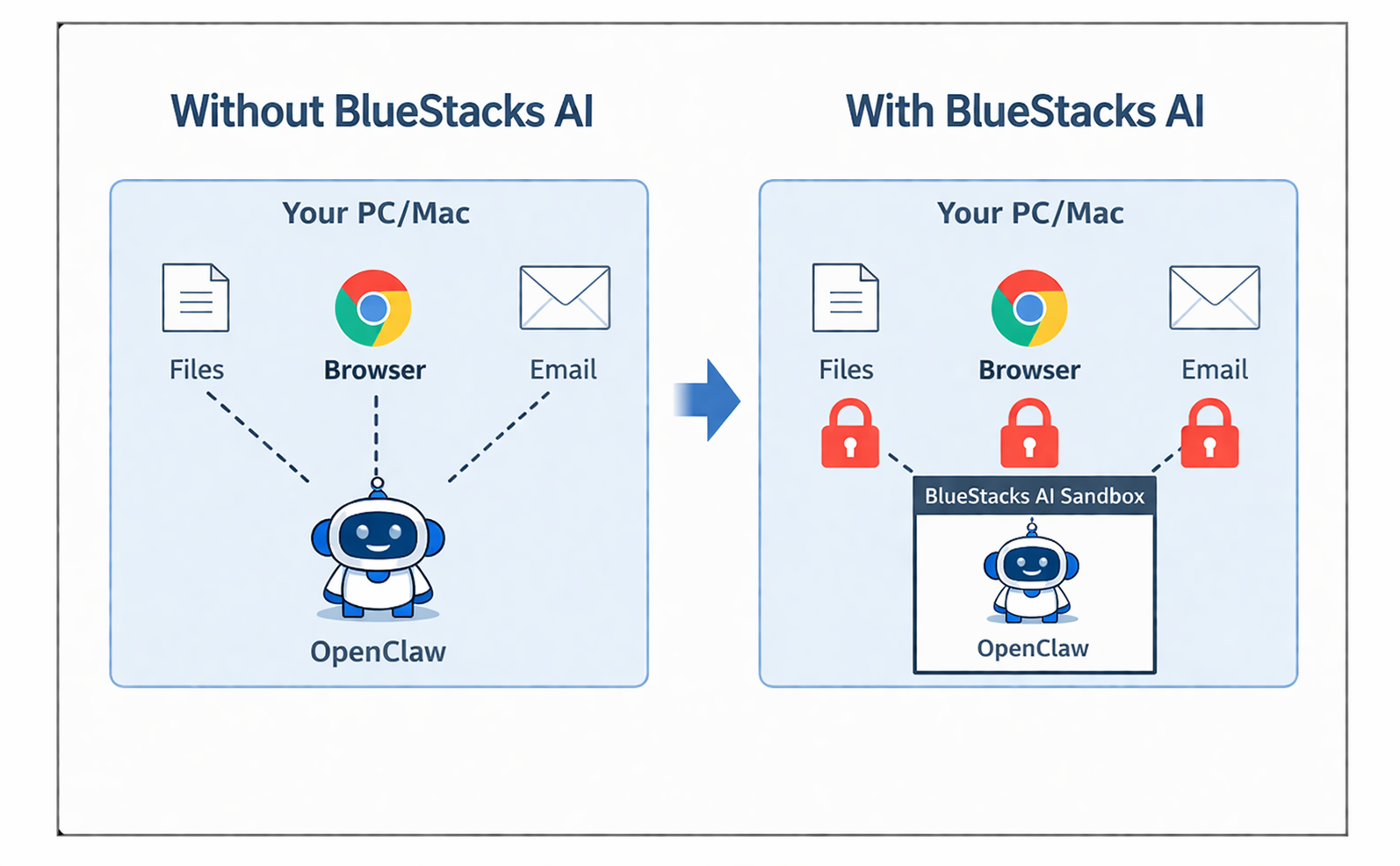
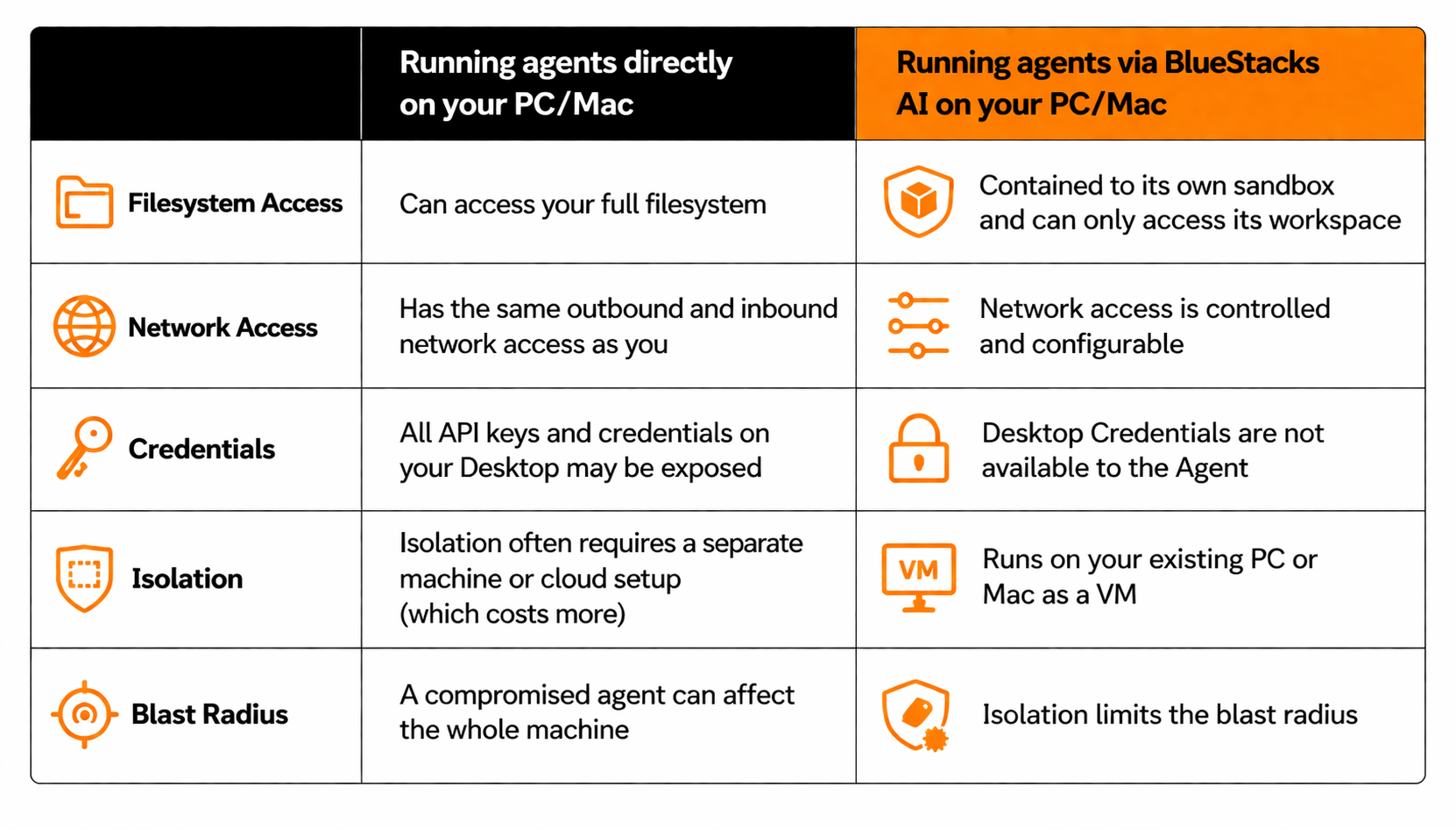
Sandboxed Execution — Built on BlueStacks Virtualization
The entire agent runtime runs inside a virtualized environment, isolated from the host kernel. This is not just a lightweight software wrapper. It is a deeper virtualization layer beneath the agent, built on technology BlueStacks AI has battle-tested across millions of users.
That architectural choice matters. NVIDIA recommends full kernel-level virtualization over shared-kernel approaches because agents execute arbitrary code by design. Shared kernels can leave the host exposed in ways that become more serious as agents grow more capable. BlueStacks AI addresses that at the foundation.
Agent Isolation
Agent runs in its own isolated VM — it can't read or write files outside its designated workspace. If the agent is manipulated, the damage stays contained to the VM. Your system directories, dotfiles, and config files are untouchable. NVIDIA Red Team flags this as their #1 mandatory control: blocking file writes outside the active workspace is the single most effective mitigation against indirect prompt injection attacks.
Controlled OS Environment
The agent has no direct write access outside its workspace — not to shell configs, not to system paths, not to other applications. Even if an attacker tricks the agent into trying, the OS-level controls block it before anything happens. NVIDIA specifically calls out files like ~/.zshrc and ~/.gitconfig as high-value targets — overwriting them can give attackers persistent code execution. BlueStacks AI blocks these writes at the infrastructure level, not just the application layer.
No Direct Host Access
The agent is isolated from your system files and credentials. API keys, SSH keys, browser sessions — none of these are inherited by the agent environment. The blast radius of any compromise is limited to the agent's own workspace. NVIDIA recommends a "secret injection" approach: start the agent with minimal credentials, then scope in only what the current task needs. We apply this principle so your .env files and API tokens stay off-limits by default.
Network-Level Configuration
Outbound network access is controlled rather than left fully open. The agent can reach the APIs and services it needs, but it cannot freely connect to arbitrary destinations. DNS resolution and outbound connections are scoped at the infrastructure level to reduce unnecessary exposure and limit the risk of unintended data transfer. NVIDIA also highlights unrestricted network access as a key risk area in agentic systems, which is why network controls are treated here as a core part of the sandbox, not an optional extra.
As agents grow more capable, security and ownership become inseparable. The more context an agent gathers about your work, habits, and data, the more important it is that this intelligence stays under your control. BlueStacks AI Runtime is built around that idea, using isolation by design to make personal AI safer to run on your PC or Mac.
For a deeper dive: Practical Security Guidance for Sandboxing Agentic Workflows and Managing Execution Risk